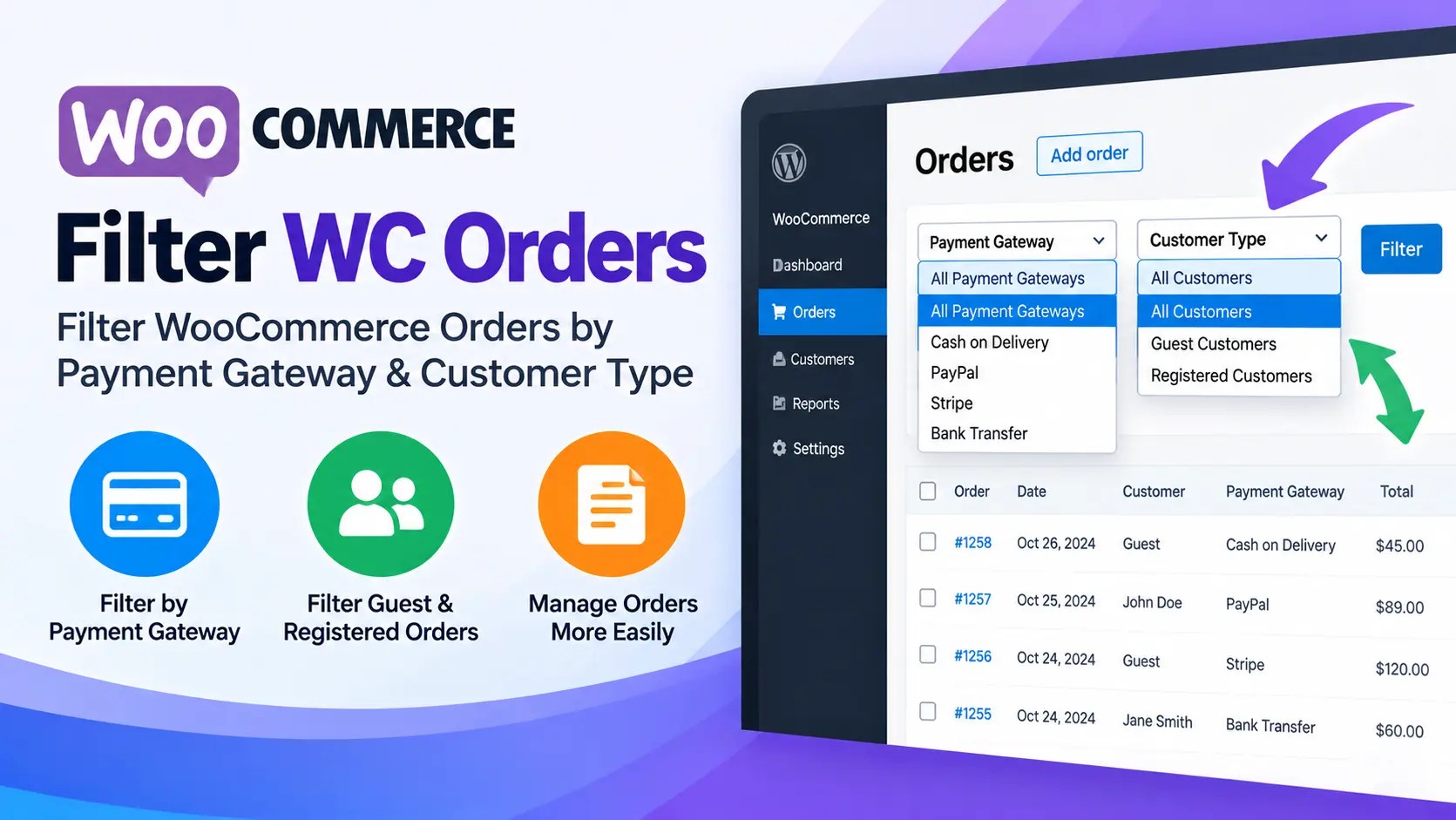
Filter WC Orders – Filter WooCommerce Orders by Payment Gateway and Customer Type
Managing orders in WooCommerce can become difficult when your online store receives a large number of orders.
WooCommerce provides an order management interface where store administrators can view, search, and manage customer orders. However, when you need to find orders processed through a specific payment gateway or identify orders placed by guest customers, filtering the order list can make your work easier.
Filter WC Orders is a WordPress plugin that helps WooCommerce administrators filter orders based on payment gateways and customer types.
With this plugin, you can quickly find orders processed through a particular payment method and distinguish between guest customers and registered shop customers.
This makes order management more convenient, especially for WooCommerce stores that handle different payment methods and customer types.
What Is Filter WC Orders?
Filter WC Orders is a WordPress plugin designed to improve the WooCommerce order administration experience.
It adds additional filtering options to the WooCommerce orders screen, allowing administrators to organize and find orders based on:
- Payment gateway
- Guest customers
- Registered shop customers
Instead of manually checking individual orders, administrators can use the available filters to narrow down the order list.
The plugin is particularly useful for store owners who need to review orders based on how customers paid or whether customers placed their orders as guests or registered users.
Plugin: Filter WC Orders
Platform: WordPress
Requires: WooCommerce
Why Use Filter WC Orders?
WooCommerce stores can receive orders from customers using different payment methods.
For example, a store may accept payments through:
- Cash on Delivery (COD)
- PayPal
- Stripe
- Bank transfer
- Other installed payment gateways
Similarly, customers may place orders as registered users or without creating an account.
When you need to review orders belonging to a particular payment gateway or customer type, manually searching through the order list can take time.
Filter WC Orders simplifies this process by providing additional filtering options in the WooCommerce administration area.
With this plugin, you can:
- Filter orders by payment gateway.
- Find orders placed by guest customers.
- Filter orders placed by registered shop customers.
- Narrow down the WooCommerce order list.
- Manage orders more efficiently.
Filter WC Orders Features
1. Filter WooCommerce Orders by Payment Gateway
One of the primary features of Filter WC Orders is payment gateway filtering.
WooCommerce allows customers to choose from the payment methods available in your store.
When your store supports multiple payment gateways, you may need to find orders processed through a particular gateway.
For example, you may want to review:
- Orders paid through PayPal.
- Orders processed using Stripe.
- Orders placed using Cash on Delivery.
- Orders processed through another available payment method.
Filter WC Orders provides a payment gateway filter that helps administrators narrow down the order list based on the payment method used.
This makes it easier to review payment-specific orders without manually opening each order.
2. Filter Orders by Guest Customers
WooCommerce allows customers to place orders without creating an account when guest checkout is enabled.
These orders can be difficult to distinguish when you are reviewing a large number of customer orders.
Filter WC Orders provides a customer-type filter that helps administrators identify orders placed by guest customers.
This is useful when you want to:
- Review guest checkout orders.
- Find orders placed without a registered account.
- Manage guest customer purchases.
- Analyze orders based on customer registration status.
3. Filter Orders by Registered Shop Customers
Registered customers can log in to their WooCommerce accounts and place orders.
When your store has many registered customers, finding orders associated with customer accounts can become more convenient with an additional filter.
Filter WC Orders allows administrators to filter orders by registered shop customers.
This helps you distinguish between orders placed by registered customers and orders placed through guest checkout.
4. Simplify WooCommerce Order Management
The WooCommerce administration dashboard provides several tools for managing customer orders.
However, additional filtering options can make it easier to locate specific groups of orders.
Filter WC Orders helps administrators narrow down the order list based on payment gateway and customer type.
This can be particularly useful when managing a store with:
- Multiple payment methods.
- Guest checkout enabled.
- Registered customer accounts.
- A large number of orders.
How to Install Filter WC Orders
You can install Filter WC Orders from your WordPress administration dashboard.
Step 1: Open WordPress Administration
Log in to your WordPress dashboard.
Step 2: Navigate to Plugins
Go to:
Plugins → Add New Plugin
Step 3: Search for Filter WC Orders
Search for:
Filter WC Orders
Step 4: Install the Plugin
Click Install Now.
Step 5: Activate the Plugin
After installation, click Activate.
Once activated, the plugin adds its order filtering functionality to the WooCommerce administration interface.
How to Use Filter WC Orders
After installing and activating the plugin, you can use its filtering options to find WooCommerce orders.
Step 1: Open WooCommerce Orders
Navigate to:
WordPress Dashboard → WooCommerce → Orders
The orders page displays the available WooCommerce orders.
Step 2: Select a Payment Gateway
Use the payment gateway filter to select the payment method you want to review.
For example, you can filter orders processed through a particular payment gateway.
Step 3: Select the Customer Type
Use the customer-type filtering option to narrow down the orders.
Depending on your requirements, you can filter orders placed by:
- Guest customers.
- Registered shop customers.
Step 4: Apply the Filters
Apply the available filtering options to narrow down the order list.
The resulting order list helps you locate orders matching your selected payment gateway and customer type.
Step 5: Review the Filtered Orders
Once the filters are applied, you can review the matching WooCommerce orders and continue managing them through the standard WooCommerce administration interface.
Filter WC Orders Use Cases
Review Cash on Delivery Orders
If your store accepts Cash on Delivery payments, you may want to review orders placed using this payment method.
Payment gateway filtering helps you locate the relevant orders without manually checking every order.
Find Guest Checkout Orders
Guest checkout allows customers to purchase products without creating an account.
Filter WC Orders makes it easier to identify orders placed by guest customers.
This can be helpful when reviewing guest checkout activity.
Review Registered Customer Orders
If you want to focus on orders placed by registered customers, you can use the customer-type filter to narrow down the order list.
This helps you review orders associated with customer accounts.
Manage Orders from Different Payment Methods
Stores that support multiple payment gateways may need to review orders based on their payment method.
The payment gateway filter helps administrators organize the order list according to the payment method used.
Frequently Asked Questions
What does Filter WC Orders do?
Filter WC Orders adds filtering functionality to WooCommerce order administration.
It helps administrators filter orders based on payment gateways and customer types.
Can I filter WooCommerce orders by payment method?
Yes.
The plugin provides payment gateway-based filtering to help administrators find orders processed through a particular payment method.
Can I filter guest orders?
Yes.
Filter WC Orders supports filtering orders placed by guest customers.
Can I filter orders placed by registered customers?
Yes.
The plugin provides customer-type filtering for registered shop customers.
Does Filter WC Orders work with WooCommerce?
Yes.
Filter WC Orders is designed to extend WooCommerce order administration.
WooCommerce must be installed and available for the plugin’s functionality to be used.
Who developed Filter WC Orders?
Filter WC Orders was developed by Dinesh Yadav.
You can visit the developer’s website for additional WordPress plugin information.
Developer Resources
Filter WC Orders is available as a WordPress plugin.
You can explore its source code, review the README, and learn more about its functionality through the GitHub repository.
GitHub Repository:
https://github.com/dineshinau/filter-wc-orders
Conclusion
Filter WC Orders makes WooCommerce order administration more convenient by providing additional filtering options.
With payment gateway-based filtering and customer-type filtering, administrators can find orders based on how customers paid and whether they placed orders as guests or registered users.
If you manage a WooCommerce store with multiple payment methods or different customer types, Filter WC Orders can help simplify your order management workflow.
Explore the plugin and see how its filtering options can make managing WooCommerce orders easier.
GitHub Repository (Zip Download):
https://github.com/dineshinau/filter-wc-orders/raw/refs/heads/master/filter-wc-orders.zip
WordPress plugin page: (Closed)